Why Google Ads Management Matters More Than Ever
Imagine this. Someone is searching on Google right now for the exact product or service you offer. They are ready to buy. The only question is—will they find you or your competitor?
This is where Google Ads management becomes a game changer. Google Ads is not just about running ads. It is about showing the right message to the right person at the right time. When managed properly, Google Ads can bring instant traffic, quality leads, and real sales. When managed poorly, it can burn money fast.
Have you ever run Google Ads but felt like the results did not match the cost? You are not alone.
In this guide, we will talk like real people. No hard words. No confusing theory. Just clear, practical steps you can actually use.
What Is Google Ads Management?
Google Ads management means planning, running, tracking, and improving your Google Ads campaigns to get the best result at the lowest cost. It includes many small but important tasks. These tasks work together to make your ads profitable.
Some people think Google Ads is simple. Set a budget, write an ad, and done. But real success comes from smart campaign optimization, testing, and daily improvement.
Good Google Ads campaign management focuses on results, not just clicks.

Why Proper Google Ads Management Is Important
Running ads without management is like driving a car with your eyes closed. Here is why proper management matters.
First, it helps control your budget. Google Ads can spend money very fast. Without control, costs go up and returns go down.
Second, it improves ad quality. Google rewards relevant ads with lower cost and better positions. That means better results with less money.
Third, it helps you reach the right people. Not everyone should see your ad. Proper targeting saves money and increases conversions.
How Google Ads Works (In Simple Words)
Google Ads works on an auction system. When someone searches on Google, Google checks all ads that match that search. Then it decides which ads to show.
Google looks at three main things.
- Your bid (how much you are willing to pay)
- Your ad quality
- Your landing page experience
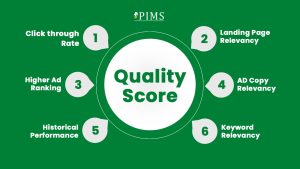
This is where Quality Score plays a big role. A higher quality score means lower cost and better placement.
Good PPC management focuses on improving quality, not just increasing bids.
Types of Google Ads Campaigns You Should Know
Before running ads, you must understand the main campaign types.
Search Ads
Search ads appear when people search for something on Google.
These ads are powerful because the user already has intent. They are actively looking.
Search ads work best for services, local businesses, and high-intent products.
Display Ads
Display ads appear on websites, apps, and YouTube.
They are good for brand awareness and remarketing.
Display ads usually cost less but need smart targeting to avoid wasted clicks.
Shopping Ads
Shopping ads show product images, prices, and store names.
They are perfect for eCommerce businesses.
Good Google Ads optimization is critical here because product feed quality matters a lot.
Video Ads (YouTube Ads)
Video ads help tell your brand story. They are great for awareness and retargeting.
Short, clear videos work best.
Setting Clear Goals Before Running Ads
This is one of the biggest mistakes people make. They run ads without knowing what success looks like. Before you start, ask yourself one question. What do I want from Google Ads?
Common goals include:
- More website traffic
- More leads
- More sales
- Brand awareness
Each goal needs a different setup. Good Google Ads strategy always starts with a clear goal.
Keyword Research: The Heart of Google Ads Management
Keywords decide who sees your ads. Choosing the wrong keywords means wasting money. Choosing the right keywords means quality traffic. Focus on intent-based keywords. These are keywords where people are ready to act. For example:
- “Buy running shoes online”
- “Best digital marketing agency near me”
Use tools like Google Keyword Planner. Look at search volume, competition, and cost.
Always start with high-intent keywords before broad ones.
Match Types: Control Who Sees Your Ads
Google gives you different match types.
- Broad match
- Phrase match
- Exact match
Exact and phrase match give more control. Broad match gives more reach but needs strong monitoring.
Smart ad account management uses a mix but starts with control.
Negative Keywords: Stop Wasting Money
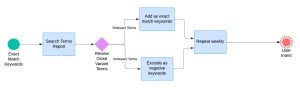
Negative keywords are your best friend. They stop your ads from showing for wrong searches. For example, if you sell paid services, add “free” as a negative keyword. Review search terms regularly. This simple habit can save a lot of money.
Writing Ad Copy That Gets Clicks and Conversions
Your ad copy is your first conversation with the customer. If your ad does not connect, people will scroll past it. Simple words and clear value work best. Start with a strong headline. Match your headline with the keyword the user searched for. This increases relevance and trust. Use benefits, not features. Tell users what problem you solve and how life gets better.
Add a clear call to action like “Get a Free Quote” or “Book Now.” Good ad copy optimization improves both click-through rate and Quality Score.
Using Ad Extensions to Boost Performance
Ad extensions make your ads bigger and more useful. They also improve visibility without extra cost. Common extensions include:
- Sitelink extensions
- Call extensions
- Location extensions
- Callout extensions
These give users more reasons to click. They also improve ad rank.
Smart Google Ads account management always uses relevant extensions.
Landing Page Optimization: Where Conversions Happen
Getting clicks is easy. Getting conversions is the real work. Your landing page must match your ad message. If the ad says “Free Consultation,” the page should show that clearly. Keep the page simple. One goal. One action. Use fast-loading pages. A slow page kills conversions.
Strong headlines, clear benefits, and trust signals matter. Good landing page optimization can double results without increasing ad spend.
Conversion Tracking: Measure What Really Matters
If you are not tracking conversions, you are guessing. Conversion tracking shows what works and what does not. Track actions like:
- Form submissions
- Phone calls
- Purchases
- App installs
Use Google Ads conversion tracking and connect Google Analytics.
This data helps improve bidding and optimization. Effective performance marketing depends on accurate tracking.
Bidding Strategies Explained Simply
Google Ads offers many bidding options. Manual CPC gives full control. Smart bidding uses machine learning. Popular smart bidding options include:
- Maximize conversions
- Target CPA
- Maximize conversion value
Start simple. Use manual or Maximize Conversions with a small budget.
As data grows, move to advanced strategies. Smart PPC bid management balances cost and results.
Audience Targeting: Reach the Right People
Not all visitors are equal. Audience targeting helps focus on users more likely to convert. You can target:
- In-market audiences
- Custom intent audiences
- Remarketing audiences
Remarketing is powerful. Show ads to people who already visited your site.
This increases trust and lowers cost. Strong audience targeting improves ROI.
Location and Device Optimization
Location matters. If your business serves specific areas, target them clearly. Remove locations that do not perform well. Check device performance. Sometimes mobile converts better. Sometimes desktop works best. Adjust bids based on data. Data-driven campaign optimization saves money and improves results.
Daily and Weekly Optimization Tasks
Google Ads is not “set and forget.” Daily checks prevent problems. Weekly reviews improve performance. Daily tasks include:
- Budget monitoring
- Error checks
- Sudden performance drops
Weekly tasks include:
- Search term review
- Keyword optimization
- Ad performance testing
Consistent work brings consistent results. Good Google Ads optimization is a habit, not a one-time task.
A/B Testing: Improve Without Risk
Never guess what works. Test it. Test one thing at a time.
- Headlines
- Descriptions
- Calls to action
- Landing pages
Pause poor performers and scale winners.
Small improvements add up. Smart A/B testing improves results over time.
Common Google Ads Mistakes to Avoid
Many advertisers waste money because of simple mistakes. Common issues include:
- No negative keywords
- Sending traffic to the homepage
- Ignoring search terms report
- Running too many keywords at once
Avoiding these mistakes can save thousands.
Professional Google Ads management services focus on preventing these errors.
When to Hire a Google Ads Expert
Sometimes, managing ads yourself makes sense. But when budgets grow, mistakes cost more. Hiring an expert helps with:
- Faster growth
- Better ROI
- Advanced strategy
- Time savings
A skilled Google Ads specialist brings experience and structure.
Scaling Google Ads Without Losing Control
Scaling does not mean spending more money blindly. It means increasing budget only where results are proven. Start with your best performing campaigns and keywords. Increase budget slowly. Watch performance for a few days before scaling further. Duplicate winning campaigns and test new audiences or locations. Smart Google Ads scaling strategies protect ROI while growing faster.
Budget Management: Spend Smart, Not Fast
Budget control is one of the most important skills in Google Ads. Set daily budgets based on business goals, not emotions. Allocate more budget to campaigns with strong conversion rates and lower cost per lead. Pause or reduce budget for underperforming campaigns. Effective ad budget optimization keeps costs predictable and profitable.
Industry-Specific Google Ads Tips
Different industries need different strategies. For local services, focus on search ads with location targeting and call extensions. For eCommerce, shopping ads and remarketing work best. For B2B, long-tail keywords and lead-focused landing pages perform better. Understanding your industry improves Google Ads strategy and reduces wasted spend.
Using Automation Without Losing Human Control
Google Ads automation is powerful but not perfect. Automation works best when guided by data and clear goals. Use automated bidding but review performance weekly.
Let automation handle repetitive tasks, but keep strategy human-led. Balanced automated campaign management delivers better long-term results.
Remarketing: Turn Visitors Into Buyers
Most people do not convert on the first visit. Remarketing brings them back. Show reminder ads to website visitors, cart abandoners, or past customers. Use simple messages like discounts, offers, or reminders. Remarketing improves trust and lowers cost per conversion. Strong remarketing campaigns increase overall ROI.
Quality Score: Lower Costs, Better Results
Quality Score affects how much you pay per click. Higher Quality Score means lower cost and better ad position. Improve Quality Score by:
- Matching keywords to ad copy
- Improving click-through rate
- Optimizing landing pages
Small improvements here make a big impact. Smart Quality Score optimization saves money every day.
Tracking ROI and Business Growth
Clicks do not pay bills. Results do. Track return on investment, not just traffic. Connect Google Ads with Analytics and CRM tools if possible. Measure leads, sales, and revenue. Data-driven ROI tracking helps make smarter decisions.
Google Ads Trends You Should Watch
Google Ads keeps changing. AI-powered bidding is growing fast. Privacy changes affect tracking. First-party data is becoming more important. Video and Performance Max campaigns are expanding. Staying updated helps maintain strong Google Ads performance in the long run.
Tips to Improve Results Fast
Here are practical tips you can apply today:
- Add negative keywords every week
- Pause low-performing ads
- Improve landing page speed
- Focus on high-intent keywords
- Test one change at a time
These small actions deliver real improvement.
Is Google Ads Worth It in 2025 and Beyond?
Yes, when managed correctly.
Google Ads still offers one of the fastest ways to reach ready-to-buy customers.
Success depends on planning, testing, and optimization.
Strong digital marketing with Google Ads management turns ad spend into business growth.
Bottom Line: Final Review
Google Ads is powerful, but only when managed with care.
It is not about spending more. It is about spending smarter.
From keyword research to conversion tracking, every step matters.
If you want consistent leads, sales, and growth, invest time or expertise in proper Google Ads management.
When done right, Google Ads is not a cost.
It is an investment that pays back again and again.
FAQ
1. What is Google Ads management?
Google Ads management is the process of creating, monitoring, and optimizing Google Ads campaigns to get the best results at the lowest cost. It includes keyword research, ad creation, bidding, tracking conversions, and ongoing optimization.
2. How much does Google Ads management cost?
The cost depends on your ad budget, industry competition, and campaign goals. Management fees are usually charged monthly or as a percentage of ad spend, while ad costs are paid directly to Google.
3. How long does it take to see results from Google Ads?
You can start getting traffic within hours of launching a campaign. However, meaningful and stable results usually take 2 to 4 weeks of testing and optimization.
4. Is Google Ads better than SEO?
Google Ads delivers instant traffic and quick results, while SEO takes time but provides long-term growth. The best strategy is to use both together for maximum visibility and conversions.
5. Can I manage Google Ads myself or should I hire an expert?
You can manage Google Ads yourself for small budgets, but as costs grow, mistakes become expensive. Hiring a Google Ads expert helps improve ROI, reduce wasted spend, and scale campaigns safely.